
-
 Shopping Cart (0)
Cart Total:
Your cart is currently empty..
Vape Troubleshooting
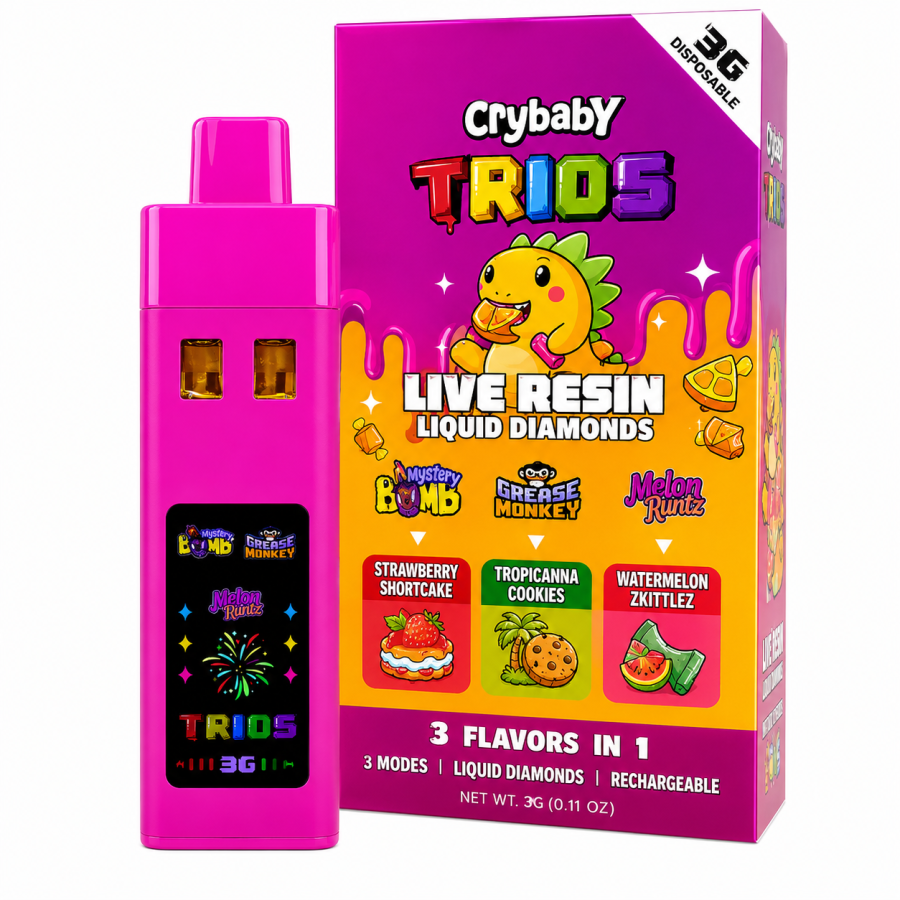
CRYBABY TRIOS 3 IN 1 Vape Pen Not Working: Hardware Diagnosis Guide
- Friday, 04 September 2026
- 0
- 196
- 0
The CRYBABY TRIOS 3 IN 1 uses a multi-chamber hardware structure that integrates multiple oil reservoirs, heating components and airflow pathways into one device.
When a device produces no vapor, the cause may come from several hardware areas, including airflow restriction, battery output, chamber connection, sensor activation or internal component alignment.
This guide explains how to diagnose common CRYBABY TRIOS 3 IN 1 hardware issues through a systematic troubleshooting process.
Important Notice: This article discusses empty vape hardware only. No oil, nicotine, cannabis, concentrate, e-liquid or filled consumable product is included.Key Takeaways
✓ Multi-chamber vape hardware requires correct airflow and chamber connection to operate properly.
✓ No vapor does not always mean the battery or coil has failed.
✓ Airflow blockage can prevent auto-draw sensors from activating.
✓ Leakage can affect electrical contacts and heating performance.
✓ Wholesale buyers should evaluate chamber alignment, sealing and QC testing before production.
Start with Basic Preparation Checks
Remove All Protective Stickers and Plugs
Companies put small plastic stickers and silicone plugs on new devices. These parts keep e-liquid from leaking during shipping. You must find and take off every one before you use it.
Check the mouthpiece first. Many devices have a clear plastic film over the opening. This film keeps dust and dirt out of the airway. Pull it off completely. Next, look at the bottom of the device. A silicone plug often sits inside the bottom air intake hole. This plug stops liquid from escaping during shipping. Use your fingernail or a small tool to gently pry it out. Some models also have a sticker on the side that covers the airflow ring. Remove that sticker too.
You might miss a plug if it sits deep inside the device. Shine a flashlight into the mouthpiece and the bottom opening. Look for anything that blocks the airway. A blocked airway makes the device feel tight when you draw. It also stops the auto-draw sensor from working. After you remove all seals, take a short test puff. You should feel air moving freely through the device.
Inspect for Leaks or Moisture
Leaks cause many problems with disposable vapes. A vape pen not working often comes from e-liquid in the wrong place. Check for visible signs of leakage before you try anything else.
Look at the mouthpiece area first. E-liquid residue looks like a wet film or small drops around the opening. Check the seam where the mouthpiece meets the main body. Run your finger along this joint to feel for moisture. Finally, look at the bottom of the device near the air intake holes. Any sticky or wet residue there signals a problem.
Several factors cause leaks in new devices. Extra liquid can sit in the coil or airflow chamber from the factory. Condensation builds up when you take long or hard draws. The device may have been stored flat or upside down during shipping. Pressure changes from air travel can also push liquid out. Even normal heat from your hand can cause minor seepage.
If you find a leak, wipe the device dry with a clean cloth. Focus on the mouthpiece and the bottom vents. Hold the device upright for a few minutes. This position lets excess liquid drain back toward the coil. Gravity helps when the device stands vertically.
E-liquid that reaches the battery can cause a short circuit. This short leads to unwanted activation or complete failure. Always dry the device well before you try another puff.
Visible signs of leakage include liquid coming through the mouthpiece into your mouth. Disposable vapes have no separation between the cartridge and battery. Leaked liquid has only one way out, which is the mouthpiece. Pulling too hard or taking fast puffs stops the coil from fully vaporizing the liquid. This behavior pushes extra e-liquid out of the device.
Most leak-related issues are rare. Sometimes a defective unit happens from manufacturer error or bad handling. A thin film of leaked juice on the metal contact points can block power from reaching the coil. Liquid entering the sensor hole can gum up the membrane. This obstruction stops the sensor from detecting your inhalation.
After you clean and dry the device, wait a few minutes. Then take a slow, gentle puff. If the device works, you solved the problem. If not, go to the next section to fix airflow issues.
Hardware Cause Table
| Symptom | Possible Hardware Cause |
|---|---|
| No vapor | Sensor blocked / connection issue |
| Weak vapor | Airflow restriction |
| Oil residue | Seal problem |
| One chamber fails | Chamber connection issue |
| Intermittent firing | Contact instability |
Fix Airflow and Inhalation Problems
Correct Your Grip to Unblock Air Intakes
Small air intake holes sit on the sides or bottom of your CRYBABY TRIOS 3 IN 1. These openings let air flow into the device when you puff. Many users cover these holes by accident with their fingers. This simple mistake makes the vape pen not work.
The device uses an auto-draw sensor to turn on. This sensor picks up air pressure changes when you inhale. Your puff creates a pressure drop inside the device. That drop tells the battery to heat the coil. When you cover the air intakes, air cannot flow well. The pressure never changes. The sensor never gets the signal. Your device stays silent even with a full charge and plenty of e-liquid.
Hold the device by the middle or the top part. Keep your fingers away from the bottom vents and any side openings. Check your grip before every puff. Look at the device to make sure your hand does not block the airflow path. Some models have airflow rings near the base. Make sure your palm does not rest over these adjustment points.
Try a different grip if your current hold feels odd. Pinch the device between your thumb and index finger near the mouthpiece. This position keeps the lower vents fully open. You should feel smooth, free airflow when you draw.
Clear Clogs with a Firm, Steady Puff
Airflow blockage is one of the most common issues reported with disposable vape devices. Condensed e-liquid or small debris blocks the airflow channel inside the device. This blockage stops the pressure change your auto-draw sensor needs. The result looks like a dead device, but the battery and coil work fine.
Place your mouth over the mouthpiece completely. Take a long, firm, steady puff without inhaling too hard. Think about drinking a thick milkshake through a straw. This method creates steady air pressure inside the device. That pressure pushes out small droplets of condensed e-liquid blocking the channel. The method works well for minor condensation clogs.
Do not suck with maximum force. Too much suction can create a vacuum effect. That vacuum pulls extra liquid into the coil. The flooding problem gets worse instead of better.
If the firm puff fails, try blowing gently into the mouthpiece. This reverses the airflow direction. The reversed flow pushes obstructions out through the intake vents. You can also cover the bottom air vents with your fingers while you blow. This action forces air through a narrower path, which increases the clearing pressure.
For clogs caused by cold or thickened oil, apply gentle heat first. Hold the device in your closed hands for a few minutes. Body heat warms the oil and makes it thinner. You can also use a hair dryer on low setting held about six inches away for 15 to 30 seconds. Never use an open flame.
Visible blockages in the mouthpiece need a manual approach. Use a straightened paperclip or a toothpick to gently scrape away the blockage. Do not push deeper than one inch. Going further risks damaging the internal coil. For sticky residue, use a cotton swab with isopropyl alcohol.
Most airflow problems get fixed with these steps. Take a test puff after each try. If the device still makes no vapor, move to the next section for power and battery checks.
Troubleshoot Power and Battery Issues
Charge the Device if Battery is Low
A dead battery stands as the most straightforward cause of a vape pen not working. Many disposable devices lack charging ports entirely. However, some CRYBABY TRIOS 3 IN 1 models include a charging port at the base. You must check your specific unit to know which type you own.
Look at the bottom of your device. Find a small metal or rubber-covered opening. This port accepts a standard USB charging cable. Some models use a USB-C connection. Others use a micro-USB port. Match your cable to the port shape you see.
Connect the device to a standard USB charger. Use a wall adapter or a computer port. Avoid fast-charging adapters designed for smartphones. These adapters deliver too much power for a small vape battery. Connect the cable firmly. A loose connection prevents charging completely.
Allow the device to charge for 30 to 60 minutes. Most disposable vape batteries charge quickly. You do not need to wait overnight. Check the device after 30 minutes. Some models show a small LED light that turns off when charging completes. Others have no indicator at all.
Do not leave the device charging unattended for hours. Overcharging can damage the battery. It may also reduce the total lifespan of your device. Set a timer if you tend to forget.
After charging, take a test puff. Hold the device upright during the draw. If vapor appears, you solved the problem. If nothing happens, move to the next step.
Adjust Airflow Ring for Optimal Draw
Your CRYBABY TRIOS 3 IN 1 may include an adjustable airflow ring. This ring sits near the base of the device. It controls how much air enters when you puff. A restricted setting creates a tight draw. That tight draw can prevent the auto-draw sensor from activating.
Locate the airflow ring on your device. Look for a rotating band with small holes or slots. Some models use a sliding switch instead. Check the sides and bottom of your device for these controls.
Turn the ring to the widest opening. You want maximum airflow for your first test. A wide opening lets air move freely through the device. This free movement helps the sensor detect your inhalation properly.
A restricted airflow setting mimics a clogged device. The sensor reads the tight draw as a blockage. It may not trigger the heating element at all. You might think your vape pen not working when the real issue is just a closed airflow ring.
Test the device with the widest setting. Take a slow, steady puff. You should feel air moving easily. Vapor should appear within one or two seconds. If you get vapor, you can adjust the ring to your preferred tightness later.
Some users prefer a tighter draw for stronger flavor. That preference works fine once you confirm the device functions. Start wide, confirm operation, then fine-tune the airflow to match your style.
When Your Vape Pen Not Working Persists
Realign the Mouthpiece and Internal Gasket
Shipping can move the mouthpiece a little. This movement breaks the seal inside. The broken seal blocks airflow and stops the sensor from working. Your device may look okay, but the parts inside are not lined up.
Press down gently on the mouthpiece. Use both thumbs with even pressure. You want the mouthpiece to sit fully against the body. Listen for a soft click. That click means the parts locked together the right way. Do not push too hard. Too much force can crack the plastic shell.
The CRYBABY TRIOS 3 IN 1 has several chambers. Each chamber holds a different flavor or formula. Check every pod or chamber. Press each one firmly into place. A loose chamber breaks the link between the coil and the battery. That broken link makes the whole device stop working.
Look at the seam where the mouthpiece meets the body. Run your fingernail along this line. Feel for any gap or uneven spot. A smooth seam means the parts sit correctly. A visible gap on one side means something is off. Push the higher side down until the seam looks even.
Rubber gaskets inside can also shift during shipping. These rings create airtight seals inside the device. A moved gasket lets air escape. The escaping air lowers the pressure change your sensor needs. You cannot see these gaskets without opening the device. Do not try to take it apart. You could damage the wires or the battery.
After lining up all parts, take a test puff. Hold the device upright. Draw slowly and steadily. If vapor appears, the alignment fixed the problem. If nothing happens, the issue may be deeper inside.
How Manufacturers Test Multi-Chamber Vape Hardware
| QC Test | Purpose |
|---|---|
| Chamber Activation Test | Verify each chamber works correctly |
| Airflow Test | Confirm smooth draw |
| Leakage Test | Check sealing performance |
| Coil Resistance Test | Verify heating consistency |
| Battery Output Test | Confirm stable power |
| Assembly Inspection | Ensure alignment quality |
You have now tried every hardware fix in order. Most vape pens start working again after you take off seals or clear clogs. These easy fixes solve most problems.
Going through the steps in order matters. Skipping ahead causes confusion and hides the real issue. Stay calm and work through each step.
If your device still fails after all these checks, it likely has a factory defect. Do not try to take it apart. Opening the device can hurt you because of the battery.
A broken unit is rare. You now have a clear plan. Either you fixed it yourself, or you reach out to the store for an easy replacement. For brands and distributors, selecting a supplier with consistent production control, hardware testing procedures and OEM capability is important. Best Vape Supply provides empty vape hardware solutions including multi-chamber designs, custom options and wholesale support.
FAQ
How Do I Know If My Device Is Rechargeable?
Look at the bottom of your device. Find a small port covered by a rubber flap. That port accepts a USB cable. No port means your model is single-use only. Check the packaging for charging instructions. Most disposable models do not include a charging port.
Why does one chamber work while another does not?
Multi-chamber devices contain separate internal pathways and heating systems. A single chamber failure may be related to connection, airflow or component alignment.
Can airflow problems prevent auto-draw activation?
Yes. Auto-draw systems rely on pressure changes created by airflow. Restricted airflow can prevent the sensor from detecting inhalation correctly.
How Long Should I Charge the Device?
Charge for 30 to 60 minutes maximum. Most disposable vape batteries fill quickly. Unplug the device after one hour. Overcharging shortens battery life. Use a standard USB wall adapter. Avoid fast chargers designed for smartphones. They deliver too much power for a small vape battery.
About This Article
Written by:
Best Vape Supply Hardware Engineering Team
Reviewed by:
Vape Hardware Development & QC Team
Expertise:
• Multi-Chamber Vape Hardware
• Airflow Systems
• Ceramic Heating Technology
• OEM Manufacturing
0users like this.
-
Posted on Friday, 18 September 2026
0comments
- Empty Vape Hardware
- OEM vape hardware
- Dual Chamber Vape Hardware
- Thick Oil Vape Hardware
- dual chamber vape hardware
- Disposable Vapes
- Packman 4G
- ACE Ultra
- ACE Ultra Vape Pen
- Empty Disposable Hardware
- postless vape hardware
- OEM Manufacturing
- Rechargeable vape hardware
- Dual Chamber Hardware
- 10/10 Boys Switch
- Fryd dual chamber vape
- Fryd vape pen
- Fryd 2g
- Fryd disposable 2ml
- DRANKS DUAL Disposable Vape
- dual flavors
- Vape Battery
- HITZ ZEUS EDITION 2G
- HITZ Infinity Blue 2ML Pens
- HITZ Infinity
- HITZ ZEUS
- Dual Chamber Vape
- 2g Disposable
- Dual Tanks vape pen
- Disposable Vape Pens
- Wholemelt Phase Five Switch Vapes
- Wholemelt Switch Vapes 2G
- Wholemelt Vapes 2G
- DUAL Disposable Vape
- 2ML Dual Tanks
- 2G Disposable Vape
- MUHA MEDS Gen
- Splitz Vape Pen
- Splitz Vapes 2G
- Muha meds 2G
- Splitz 2ml
- TURNONE 2ML Empty Vape Hardware
- TURNONE 2ML
- customization
- 2ML Empty Vape
- ACE 2ml Vapes
- Packman 2ml vapes
- Whole Melt Candy Shop Switch 2G
- Whole Melt Candy Shop Switch
- dual-chamber
- OG Cake
- Cake 2ml vapes
- OG Cake Vape Pen
- Cake 2G Vapes
- MUHA MEDS Gen 3
- Muha meds 2ml
- Muha meds Switch
- Muha Meds 2.5G
- Sherbinskis Quattro 2G
- activation failure
- FAVORITES Disposable 3G
- Disposable 3G
- FAVORITES Disposable
- FRYD SWITCH DISPOSABLE 2G
- FRYD Switch 2G
- disposable vape
- FRYD 2g
- Dual Chamber Pens
- HITZ ZEUS Edition 2G
- MUHA MEDS Melted Diamonds vape
- HITZ ZEUS 2G
- MUHA MEDS Melted Diamonds 3.5G
- Push V2 Summer Vape Pen
- Push V2 Summer Vape Switch
- Push 2G Vape Switch
- Push 2G Switch
- Boutiq Switch ORB V5 Triple Tank
- Boutiq Switch ORB V5
- Boutiq Switch
- Triple Tank Vape
- Packman Partyboyz Disposable Vape
- Packman Partyboyz 3G
- Packman vape pen
- Packman 2g vapes
- Raw Garden Adjustable Voltage
- Raw Garden 2G
- Raw garden Vapes
- Raw garden vape pen
- MUHA MEDS Empty Vape Pen
- SHERBINSKIS QUATTRO 2G
- MUHA MEDS 2g Vape Pen
- dual chamber Vape Pen
- Muha Meds empty vape
- 3.5ML Muha Meds
- Muha Meds 2ml
- Crybaby Trios 3G
- Crybaby Trios 3G Empty Disposable Vape
- disposable vape hardware
- Muha Meds Gen 3 empty hardware
- HitZ Infinity 2G empty hardware
- Slugger Hit 3G Triple-Chamber Vape
- Multi-Flavor Hardware
- disposable empty hardware
- Airflow Blockage
- Thick Oil Empty Vape Hardware
- thick oil vape cartridge
- OEM empty vape hardware
- DONUTS Switch GEN 2 E
- 2ML Dual Chamber Vape
- DONUTS Switch Pen 2ML
- Boutiq Switch V5
- Boutiq Dual Chamber
- Empty Vape Hardware Quality Control
- LUIGI V9 2G Empty Vape Hardware
- Donuts Gen 2 Dual Chamber
- Sprinklez Disposable Vape
- Sprinklez Disposable 2G
- Muha meds glass jars
- ACE Glass jars
- custom packaging
- UNIPUFF SWITCH DISPOSABLE 2G
- Muha Meds GTA edition
- Alien Labs Dual Empty Disposable 2G
- Alien Labs Dual
- vape pen overheating
- vape hardware troubleshooting
- vape battery overheating
- Raw Garden Vape Pen
- Ceramic Coil
- rechargeable disposable
- 2ML Empty Vape Hardware
- OG Cake Legendary Edition
- CRYBABY TRIOS 3 IN 1
- Multi-Chamber Vape
- manufacturing process
- BIG CHIEF DUO V3 Empty Vape Hardware
- Single Chamber Vape Hardware
- Sluggers Hit dual chamber
- OEM vape manufacturer
- 510 Thread Vape Cartridge
- Dual chamber
- LED screen devices
- All-In-One Vape Hardware
- Dual Vape Hardware
- 510 cartridge hardware
- ceramic vape cartridge
- OEM cartridge supplier
- ACE Ultra 2ml Dual Chamber
- Donuts Switch V4 Dual Chamber
- Single-Chamber Disposables
- Ceramic Coil Guide
- Thick Oil Hardware
- CALI CLEAR 2G
- Oil flow problems
- Ace Ultra Switch
- Ace Ultra Premium Empty Vape Hardware
- LED screen vape hardware
- Smart vape hardware
- Voltage Control
- Buzz Bar 3G Switch
- 10/10 Boys Single Flavor
- multi chamber vape hardware
- Sluggers Dual Chamber
- SMOOTHIE BAR BLEND 3.0 Switch
- Switch Empty Vape Hardware
- Multi-Chamber Empty Vape Hardware
- vape hardware airflow
- multi-chamber hardware leakage
- BESOS 3 Flavors Switch
- BESOS 3 Flavors Switch Empty Vape Hardware
- Slugger Hit 3 tanks SWITCH 3G
- 10/10 Boys Switch clogging
- SHERBINSKIS QUATTRO 2G dual chamber vape hardware
- Packman x Jeeter DUAL CHAMBER Vape Hardware
- 2G disposable vape
- Empty Triple-Chamber Vape Hardware
- OEM triple chamber vape hardware
- postless dual-chamber vape hardware
- ceramic vape hardware
- triple chamber vape hardware
- 1mL + 1mL dual-chamber vape
- dual-chamber empty vape hardware
- Khalifa Kush Switch
- HOLLOWTIPS 2G vape hardware
- HOLLOWTIPS 2G empty vape
- Hollow Tips 2G empty vape
- Hollowtips V1 empty vape hardware

Your cart is currently empty.